


Are you drowning in manual workarounds for your legacy system?
Are your staff still retyping information from PDFs, invoices, forms and receipts? Copying data between systems? Cleaning up Excel files before they can be imported?
Do you need a practical, cost-effective way to connect existing ERP, document management, CRM, project, and operational systems? We wrap private AI agents around existing legacy, open-source or SaaS system and bridge the islands into one. And it’s 100% yours in perpetuity.
Manual data entry takes hours. Reclaim your time.
If one staff member transfers and retypes data between applications for just 4 hours per week, that’s
Building bridges between business silos.
Turn disconnected systems into a workflow that moves between your ERP, your accounts, your documents, your projects, emails, tasks and people. We connect what you already have, automate the handoffs, and put AI to work.
“Evolutionize” your business with AI-assisted process automation.
AI-Assisted interpretation
Context-aware AI interprets different document types, layouts, terminology and data formats. Consistent results every time.
Private, on-site processing
The software runs on your hardware, under your roof. No cloud. No internet access. Your AI is secure and private, no expensive tokens.
ERP-agnostic and flexible
If your system can import a CSV file, we can connect to it. Alternative formats available. Or let us advise you on open-source solutions.
Human review & validation
You’re in control. “Check-and-Click” verification on a friendly dashboard. Pre-set parameters ensure your ERP gets the right data.
Click on the AI weakness to see how we handle it.
We use a Defined Scope
The risk
AI is curious by nature. It reads data it shouldn’t, transforms and deletes data in bulk instantly, and writes into systems without being aware of the consequences.
How we handle it
We define exactly what AI may access and what it may do. Data moves between systems through a staged, human-managed process — not an unsupervised algorithm.
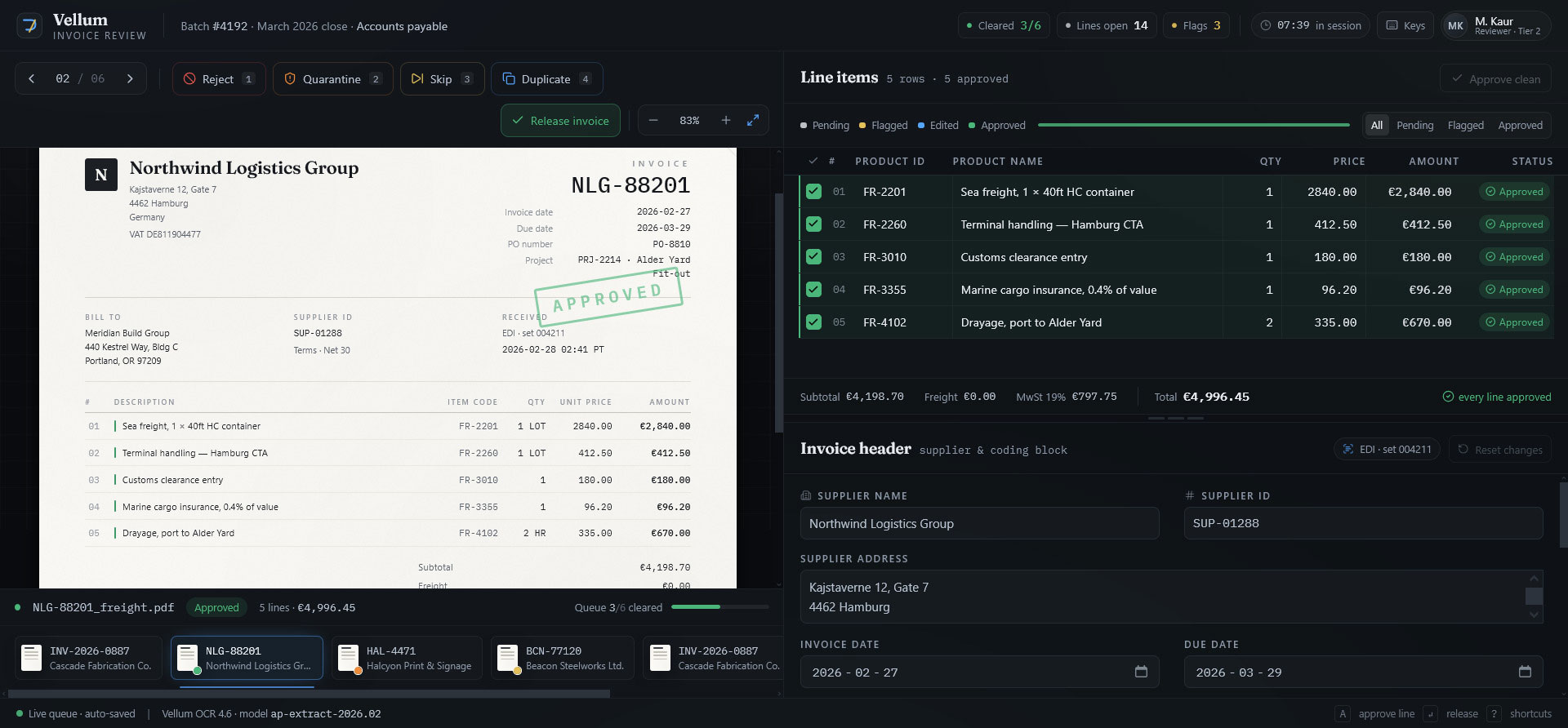
Slide 1 – Line Items Approved
The PDFs are triaged and managed on the left – quarantine, skip or reject if the PDF is not relevant or valid. Move between PDFs.
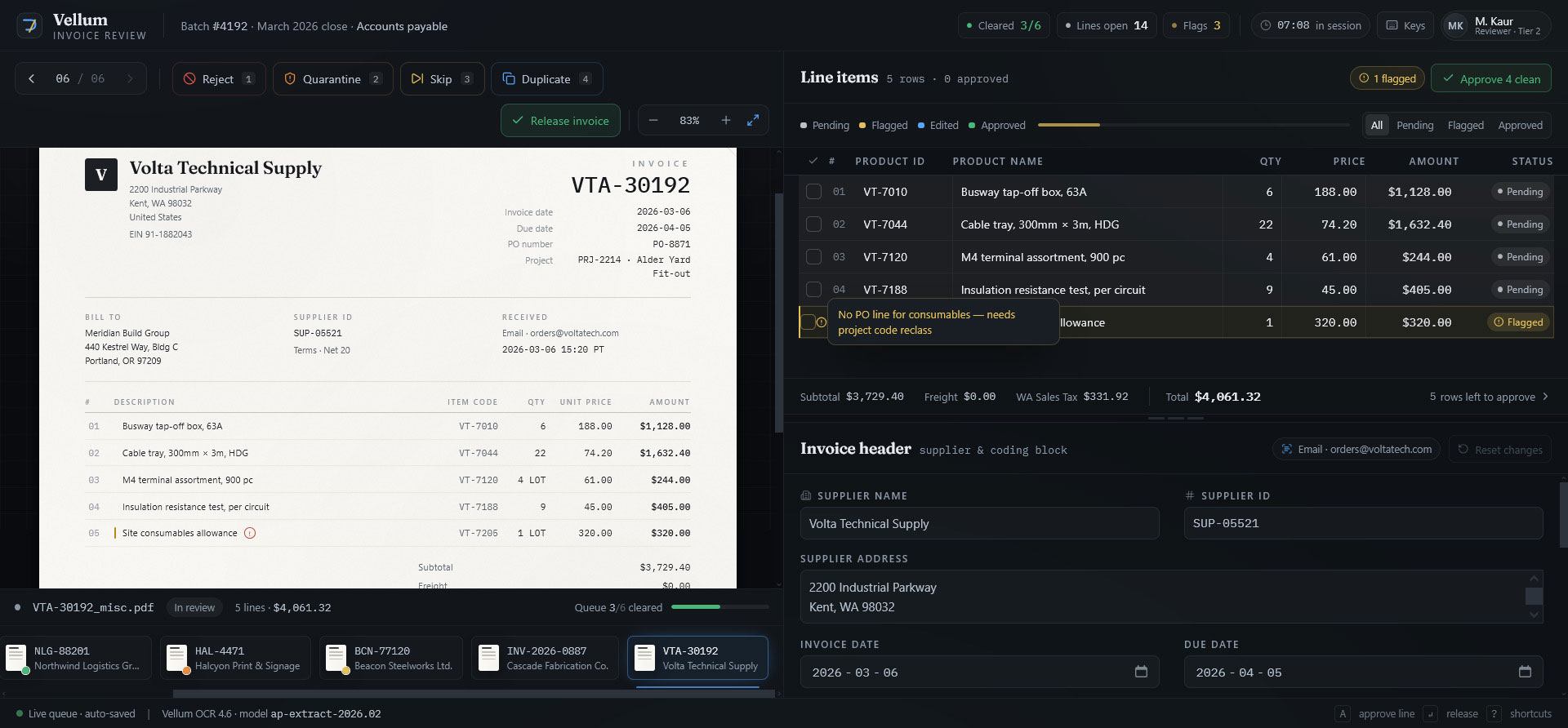
Slide 2- Line Items Flagged
Approve line items quickly (mouse or keystroke. Flags line that are not relevant. The AI assistant suggests, but a human confirms.
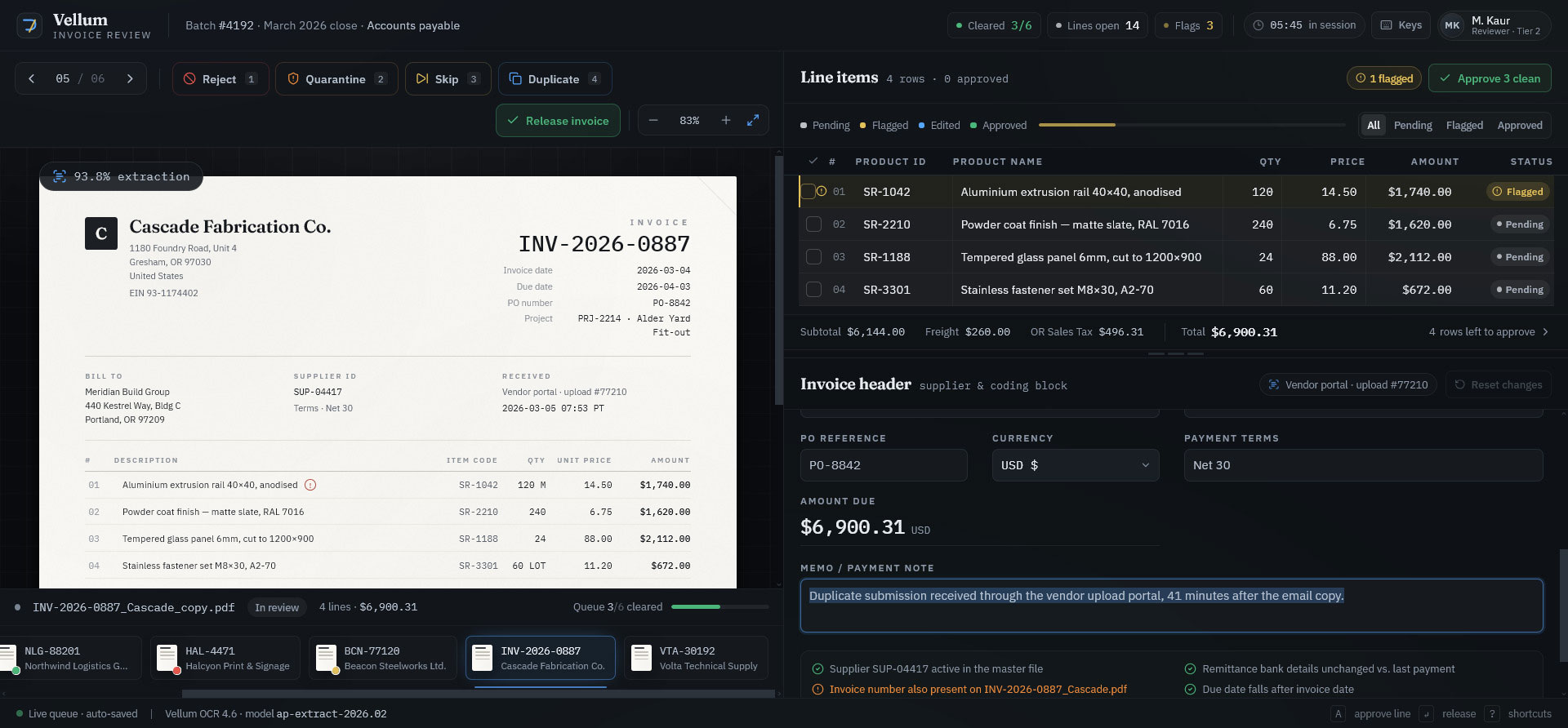
Slide 3 – Invoice Rejected (Duplicate)
The systems keeps track of what has already been done to reduce duplicates and rework and sends notifications when done.
Secure your data, empower your staff, save time, and get more out of the ERP you already own.
Here’s HOW docs2data works.
Extract data from supplier pdfs and convert it to an import-ready CSV In minutes.The core product never writes to ERP systems. CSV handoff is the boundary. Zero Risk.
Our Docs2Data engine aligns with your existing processes, folder structures, and software. If you have a legacy systems (MS NAV, Sage, Syspro, QuickBooks, WorldDocs, Clio) we work with you to identify the right importable format.

Dozens of PDFs at once. Email it, drop it in a folder, or manual import. Built to be user friendly, in a normal office environment. If a last-minute document arrives, just upload it through the interface.
The engine processes documents that most companies end up typing like quotes, invoices, delivery notes, financial fund sheets, BOMs, product specs and orders with multiple line items
Unlike standard OCR, your private, localized AI will distinguish the difference between Your Order Number and Our Order Number. Key fields are identified in a structured way across multi-page documents. The system deals with complex line items including, taxes, duties, discounts and part deliveries.
Suppliers, clients, projects and products must match lookups exported from your ERP and accounts systems.
Your quality control checkpoint. Checks document readability, document type, duplicates and completeness.
Use the dashboard to verify the AI’s work. Compare each line to the original PDF. Click a cell to correct an error.
Once the data is verified, the row is “ticked” and locked. This creates a permanent audit trail.